SRSD: Quick end for the End of Year report cycle
Probably the first thing to do is perform Default Missing Data.
Menu:7.5.1.9.

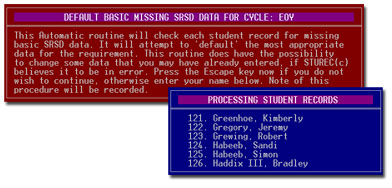
You will see a big red message reminding you what is going to
happen.
You will be asked for your name (just put in first name) and let 'er rip!
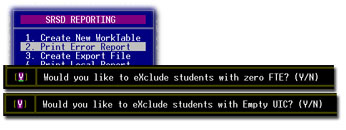
Now you can proceed to item 1. Create New Worktable. You should choose
End of Year reporting cycle and take the defaults on the next two
questions.

It will start processing the records and give you an on-screen summary
of the errors.
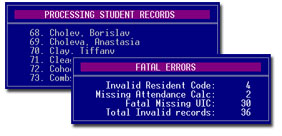
When it is finished you will want to print the error report.
You will get a report like this.
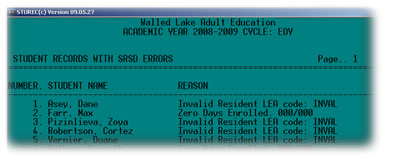
Now you should look up each student listed and see if you can actually
'fix'
whatever is reported as an error. This student was marked as an ESL
student,
but was coded as PUPil funding. This confused STUREC©. Also note that
the
grid code is incorrect. Go into the SRSD Panel and 'fix' the End of Year
cycle
and anything else you find that is incorrect.
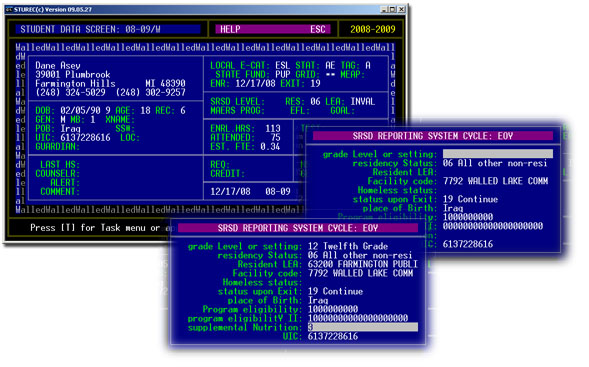
The reason STUREC© couldn't 'Default Missing Data' in this case was
because it
got confused with the ESL / PUP relationship. After you 'fix' all the
errors that you
can fix, you must run Create a New Worktable and Print Error report again.
You
may have to do this cycle several times until you are satisfied that you
have good clean data.
When you have completed your "fix errors", "create new
worktable", "print errors cycle"
you are ready for the last
two steps. Create the Export File, this is the file you pass on to
whomever
in your district needs it. STUREC© will even offer to copy it to a
floppy disk
for you. The file created will be named something like S6363290.TXT where the first
letter is always "S" followed by
your ISD code then followed by your LEA code and has
the extension of
.TXT. This file will be found in your Sturec default directory
(folder).
This file conforms to all current CEPI field definitions and structure layout
requirements.
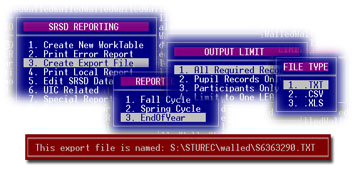
If you did not have any "Missing UIC" errors, you are
finished! If you did have Missing
UIC then do the next steps and come back here later to make your final
Export File.
If you had any "Missing UIC" errors, you must obtain UIC from
the state for those students.
If there are more than just a few, you will find it easier and safer to
have STUREC© create
a UIC Request file for you. Find this at item 3 in the UIC Related menu.
Take all the defaults.
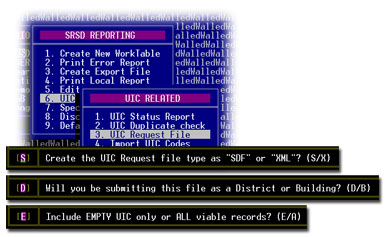
Send this file to whomever in your
district is responsible for obtaining UIC. Eventually they should return a
file to you that
contains new codes to be inserted into your database. You should save this
returned file
into your regular Sturec folder.
Select item 4. Import UIC Codes from the UIC Related sub-menu. You will see
a message.
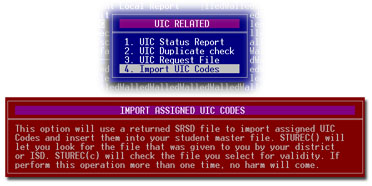
Press any key and you can select the import file. You will be presented
with the
STUREC© File Finder. You should remember the name of the file that was
returned
to you. Unfortunately it probably will not have the same name, but
hopefully something
similar or helpful. For reasons unknown, CEPI likes to add a bunch of stuff
to the name,
but it should be something similar to this...
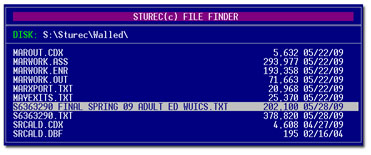
Just move the pointer to highlight the file and press Enter. STUREC©
will check the file
and try to read the names and new codes and place them into your file. If STUREC©
says it cannot find the file even though you can see most of it in the File
Finder, simply
open your local Explorer (My Computer) find the file an change its name to
something
shorter. For example "S6363290_UIC.TXT". Then go back to the File
Finder and you
will be able to retrieve the file with the now shorter name.
Now go back to Option 3. Create Export File and you will be finished for
this year.
Here are some of the errors that STUREC© checks for...
- Student not counted for FTE
- Missing or invalid residency status code
- Missing or invalid resident LEA code
- Missing or invalid Date of Birth
- Missing or invalid Place of Birth
- Local address missing and not Homeless
- marked Homeless, but has address
- Grade Level or Setting missing or invalid
- Enrolled after Count Date
- Invalid enrollment date
- Youngster less than 5 on December 1st
- Eligibility code is empty or invalid (usually both Membership and
Adult checked)
- Pupil with Adult eligibility code
- Adult with Pupil eligibility code
- Shared time Pupil with invalid residency code
- Alternative Pupil with invalid shared time code
- Student with zero days enrolled
- Student with zero days attended
- Student with missing expulsion record
- Student with invalid expulsion record
- Invalid disciplinary incident date
- Invalid expulsion date
- Missing exit code (if appropriate)
- Missing or invalid exit date (if appropriate)
STUREC© does not do any error-checking on categoricals such as Title
I, Special Ed, Limited English and so on.
And finally, for your peace of mind
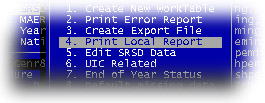
Wow, how easy is this?
Just a little reminder that at the End of Year, we do not report Fall or
Spring FTE for Pupils. The only FTE that may be reported now would be from
adults counted in the April count. Remember also -- this is where the state
gets its information for calculating your district's Drop rate and
Graduation rate. You will want to make sure that you have all of your
graduates properly marked as such. Both in the SR panel that we talked
about here, also in the HT menu under Record Actual Graduate.
There are a number of other data fields
that are not reported at the end of the year. If you have questions
you may want to consult you local district SRSD expert. Of course, if that
fails you may want to call Dr. Bob.
[WebMaster's note: for best results, print in 'Landscape' orientation.]
|
